How to Automate Lead Generation with AI Agents (Step by Step)
You automate lead generation with AI agents by giving a plain-English brief to a crew that finds targets, verifies decision-maker contacts, researches each site, and drafts personalized outreach. A pipeline built this way returns about 100 enriched leads with email drafts in roughly 10 minutes, ready for your review before anything is sent.
- ›Why does manual lead generation break down?
- ›How is an AI lead generation pipeline structured?
- ›What does the Supervisor agent do with your brief?
- ›How does the Prospector find leads and decision-maker emails?
- ›How does the Analyst research each company website?
- ›How does the Copywriter write personalized outreach at scale?
- ›What does the output look like in Google Sheets?
- ›What does AI lead gen cost compared with doing it manually?
Why does manual lead generation break down?
Manual lead gen fails in three ways at once: it is slow, it does not scale, and quality varies by person and day. Finding a generic email is easy; finding the right decision maker and writing something specific for them is where hours disappear.
A sales development rep spending three hours a day on prospecting, research, and writing is not unusual. That is roughly 60 hours a month on the same loop: find a business, find the right person, visit the website, take notes, write a personalized email. Repeat.
Tools like Apollo or ZoomInfo help with enrichment, but they still leave you doing research and writing by hand. Most manual prospecting either stops at info@ or burns time on LinkedIn guessing email formats. Neither approach holds up at 100 leads with real personalization.
An AI pipeline solves both problems at once, and applies the same depth to lead 100 as it does to lead 1. For a wider map of agent use cases beyond lead gen, see What can AI agents do for my business?.
How is an AI lead generation pipeline structured?
An automated lead gen pipeline is a team of specialized AI agents, each owning one stage, connected so output from each step feeds the next. A Supervisor coordinates the run and handles issues in real time.
Your plain-English brief goes to a Supervisor (interprets and monitors), then a Prospector (finds leads and contacts), an Analyst (researches pain points), and a Copywriter (writes personalized outreach). The finished output lands in a Google Sheet.
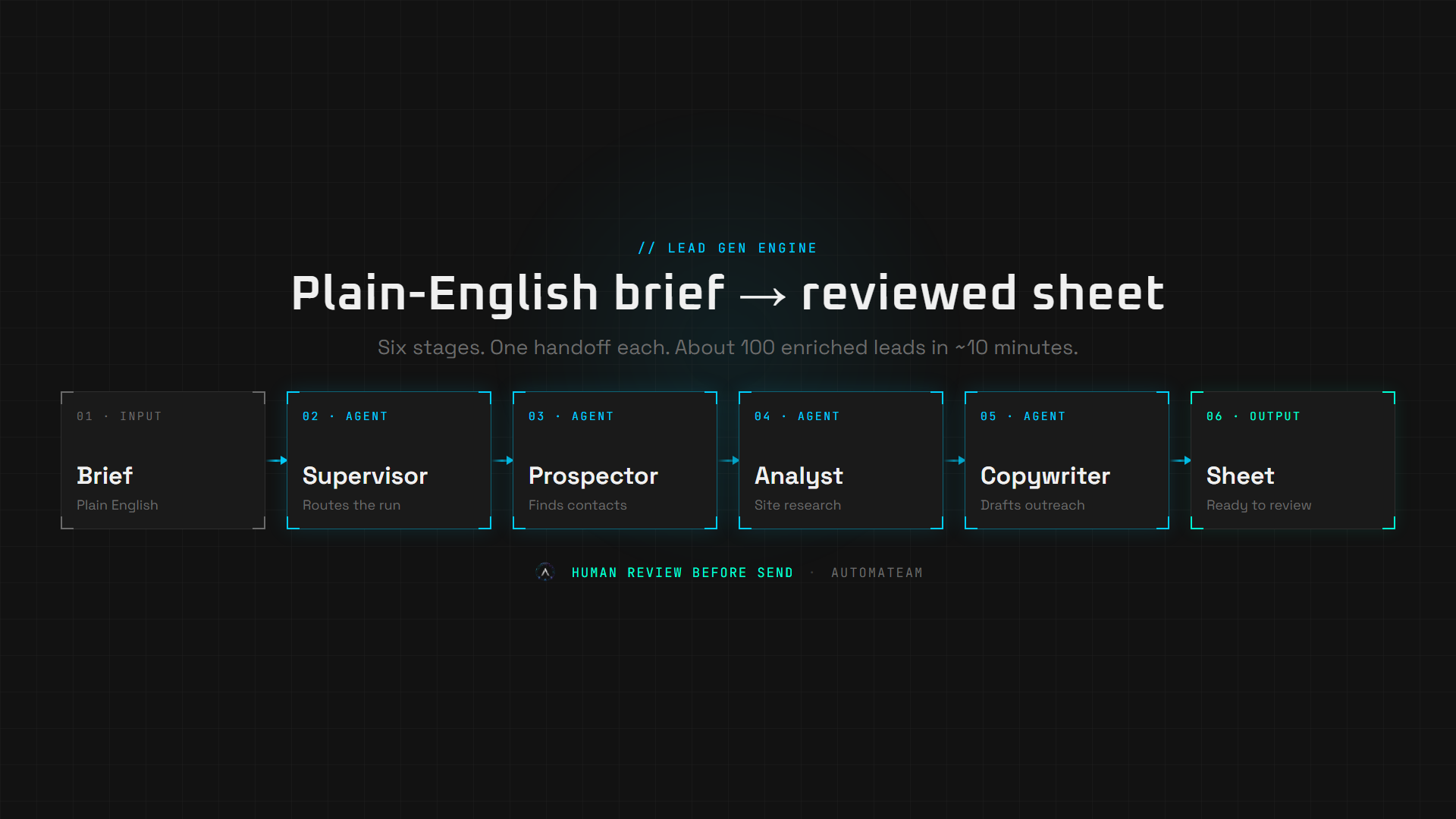
No agent tries to do everything. That is where single-model approaches fail. Each specialist does one job well and hands off cleanly. The orchestration layer (often n8n) connects them and passes structured data between stages. For how agent teams work in general, see What is an AI agent team?. You do not see the wiring. You see a finished output.
What does the Supervisor agent do with your brief?
The Supervisor reads a plain-English prompt (industry, location, offer, goal), breaks it into structured tasks, assigns them to sub-agents, and monitors the run from start to finish.
You do not configure a form or set parameters in a dashboard. You describe what you want the same way you would tell a colleague: "Find me 100 digital marketing agencies in Singapore. We offer AI automation systems. Goal is to book a discovery call." The Supervisor parses that, extracts the brief, and dispatches the crew.
Throughout the run, the Supervisor watches for issues (a search returning fewer results than expected, a website that fails to load, an agent returning incomplete output) and handles them without stopping the pipeline. If something needs a decision, it surfaces it. Otherwise, it resolves it and continues.
How does the Prospector find leads and decision-maker emails?
The Prospector searches directories and maps for matching businesses, deduplicates results, then hunts for verified decision-maker emails, not just whatever appears on the contact page.
Stage 2a: Business discovery
The Prospector searches for companies matching your target niche and location, handles pagination across multiple results pages, and deduplicates so the same business never appears twice. For each company it returns: business name, website URL, phone number, and physical address.
Stage 2b: Decision-maker contact finding
Rather than stopping at info@ or hello@, the Prospector runs targeted web searches combining the company name with role keywords: CEO, founder, owner, director. It applies a name-and-domain matching protocol to confirm the person belongs to that company and that the email format matches the domain.
Generic contact emails are still captured as a fallback on the main lead row. Verified decision-maker contacts take priority and feed the Outreach tab first.
- Business name, website, phone, address
- Contact email and source (scrape or POI search)
- Decision-maker name and role on Outreach rows (when found)
- Unique place identifier (prevents duplicates across runs)
How does the Analyst research each company website?
The Analyst visits each company's website and identifies specific, verifiable weaknesses relevant to your offer: one to three pain points per lead. If it cannot find a genuine one, it says so rather than inventing something.
This step is where most manual prospecting falls short. A researcher under time pressure skims a site in 90 seconds and moves on. The Analyst reads properly, cross-references what it finds against the offer in the brief, and surfaces only what is actually relevant.
- No contact email on the site, only a form
- Blog last updated more than 12 months ago
- No case studies, testimonials, or client results visible
- Services page with vague copy and no specifics
- Missing or broken social links
The hallucination guardrail is non-negotiable. The Analyst cites only what it can read from the page. If the site is clean and nothing maps to the offer, the output is "no pain point found", and the Copywriter handles that case differently.
How does the Copywriter write personalized outreach at scale?
The Copywriter takes pain points from the Analyst and contacts from the Prospector and writes a cold email per lead, addressed by name when a decision maker was identified, referencing a verifiable problem from their site.
- Personalized opening: name when available, first line references something specific from their site.
- Cost connection: one sentence on what that gap likely costs them.
- Offer: one sentence connecting your service to a fast resolution.
- CTA: a single, low-friction ask tied to the goal in the brief.
When no decision maker was found, the email opens with a professional generic salutation and the pain-point hook does the heavy lifting. The Copywriter runs once per contact in the batch. One hundred leads can mean dozens of unique outreach rows, each written around that lead's context, in the same run.
What does the output look like in Google Sheets?
The final output is a Google Sheet with a Leads tab for companies and an Outreach tab for contacts, pain points, and draft emails. You review before anything is sent.
Leads tab: one row per company
- businessName, website, phone, address (Prospector)
- contactEmail, emailSource (scrape or enrichment)
- Social profiles: x, instagram, facebook (when found on site)
- placeId: upsert key so reruns update instead of duplicate
Outreach tab: one row per contact
- addressee, role, targetEmail (Prospector: POI path when found)
- painPoints (Analyst: bullet points per lead)
- emailSubject, emailBody (Copywriter: personalized per contact)
Total run time for 100 leads: approximately 10 minutes end to end. You review the sheet. You decide what gets sent and to whom. The system does not send automatically. That is by design.
What does AI lead gen cost compared with doing it manually?
The honest comparison is not AI vs. free. It is AI vs. the current cost of getting the same output by hand: an SDR or VA spending hours per batch vs. a maintained agent pipeline.
- Finding the right contact per lead: 5-15 min manual vs. seconds in parallel
- Website research per lead: 3-5 min manual vs. seconds in parallel
- Email writing per lead: 5-10 min manual vs. seconds in parallel
- 100 leads total: 8-15 hours manual vs. ~10 minutes automated
- Monthly cost at scale: $2,000-5,000+ salary or VA vs. build fee + retainer
The build cost for a Lead Gen Engine is a one-time fee, plus optional dev hours at $50/hr for any custom integrations. See Scope & Cost for the full breakdown, or our Solutions page for the product catalog.
The system is not a replacement for a salesperson. It replaces the research and first-draft work that a salesperson should not be spending time on. The conversations, the relationships, and the close stay human.
Frequently asked questions
Can AI agents find decision-maker email addresses?
Yes. The Prospector agent goes beyond scraping generic contact emails from websites. It searches the web for the company combined with keywords like CEO, founder, and director, then uses a name-and-domain matching protocol to confirm the decision-maker's identity and email address with high accuracy. Generic inbox emails are recorded as a fallback, but verified decision-maker contacts take priority.
How many leads can an AI agent pipeline process in one run?
Our Lead Gen Engine returns 100 enriched leads, with verified contacts, pain points, and personalized email drafts, in approximately 10 minutes. The pipeline can be configured for larger batches depending on the target niche and location.
Is AI lead generation compliant with anti-spam rules?
The generation of leads and drafting of emails by AI is not itself a compliance issue. Compliance applies when you send. You are responsible for following applicable laws such as CAN-SPAM, GDPR, and CASL. The AI system drafts emails for your review. You decide what gets sent and to whom.
Do I need technical skills to use an AI lead generation system?
No. You interact with the Lead Gen Engine through a plain-English chat prompt. You describe your target industry, location, and offer in normal language. The Supervisor agent interprets that and runs the entire pipeline. Output arrives in a Google Sheet. No code or configuration required.
How is AI lead generation different from buying a lead list or using Apollo?
A bought list or enrichment tool gives you contacts, often with limited context. An AI lead generation pipeline finds businesses matching your criteria now, identifies the relevant decision maker, verifies their contact, visits the company website for specific pain points, and writes a personalized email for each one. The output is current, targeted, and ready for your review before send.
See what this looks like for your business
Book a free 15-minute Strategic Scope. We map your manual work and tell you honestly what is worth automating.